---
title: How do I end my online appointment?
description: How do I end my online appointment?
---
[Skip to content](https://help.healthbank.io/how-do-i-end-my-online-appointment#main-content)
Open main navigation
Close main navigation
Advice and answers from the HealthBank Team
- There are no suggestions because the search field is empty.
1. [Articles](https://help.healthbank.io/?hsLang=en)
2. [Video consultations](https://help.healthbank.io/video-consultations?hsLang=en)
July 13, 2026
# How do I end my online appointment?
## Ending an appointment
If you are in full video display, you can click on the ***red cross*** button on the bottom right.
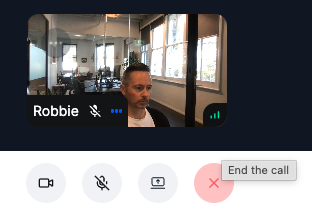
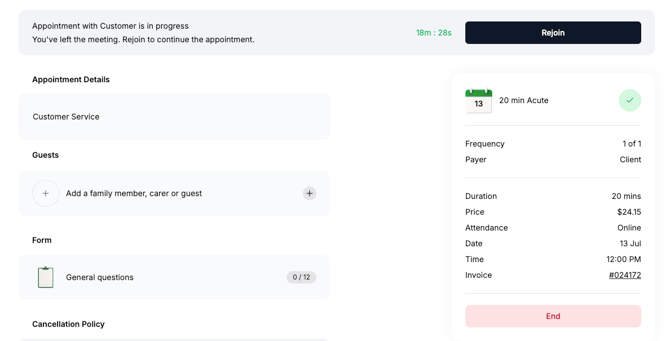
When you click on the "End the call" button, it will NOT end the appointment, but it will end the video. You will still be able to write or edit client notes and rejoin the video appointment by clicking on ***Rejoin*** button at the top of your dashboard.

To END the appointment, click on the red ***End*** button in the appointment summary.
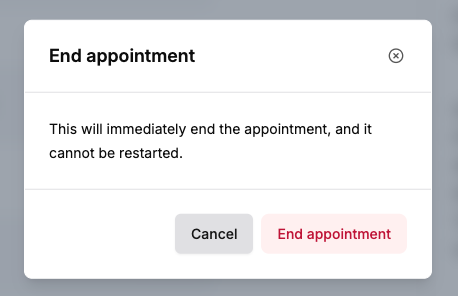
A prompt will pop up to confirm that you want to end the appointment. If you are sure, click ***End appointment*** button.
[](https://www.dashboard.healthbank.io)
HealthBank
85 William Street,
Sydney
[mailto:help@healthbank.io](mailto:help@healthbank.io)
Copyright © 2026, HealthBank Technologie Pty Ltd