.svg)
To choose the attendance mode of your appointment types, follow these steps:
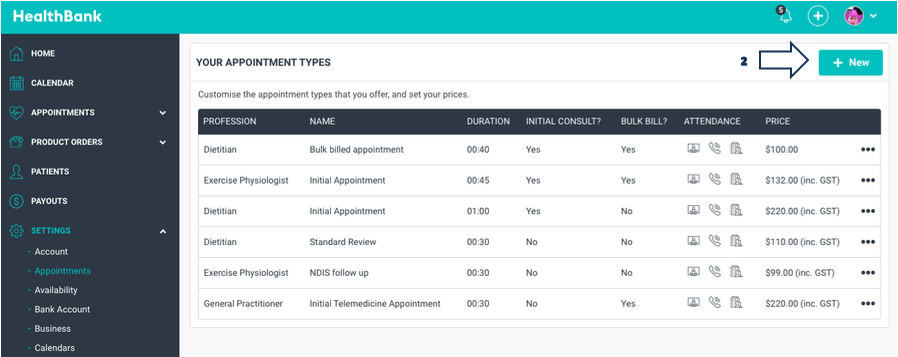
- Click on SETTINGS > APPOINTMENTS
- Click NEW button. This will bring up a "New Appointment Type" side modal.
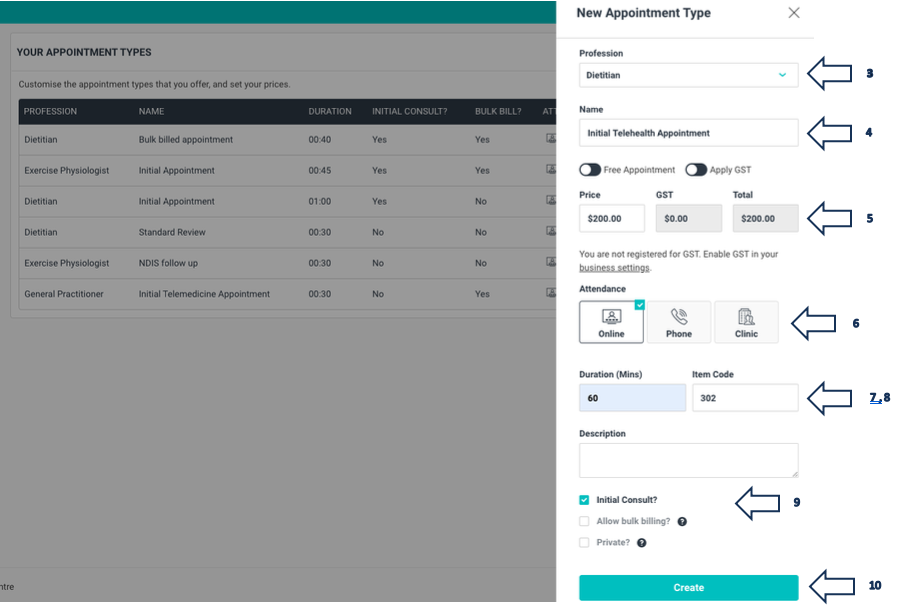
3. Choose your PROFESSION from the dropdown box.
4. Write a NAME for your Appointment type e.g. Initial Telehealth Appointment.
5. Type in the PRICE you wish to give your appointment.
6. Choose the ATTENDANCE mode i.e. Online, Phone, Clinic.
7. Set the DURATION of the appointment by typing in the minutes.
8. Set the ITEM CODE (Medicare/HICAPS) for the appointment if applicable.
9. Select INITIAL CONSULT if it is an initial appointment (this will index this
appointment higher up in the choice for your patients).
10. Click CREATE button.
Once you create this appointment type, you will see it listed under the APPOINTMENTS tab.
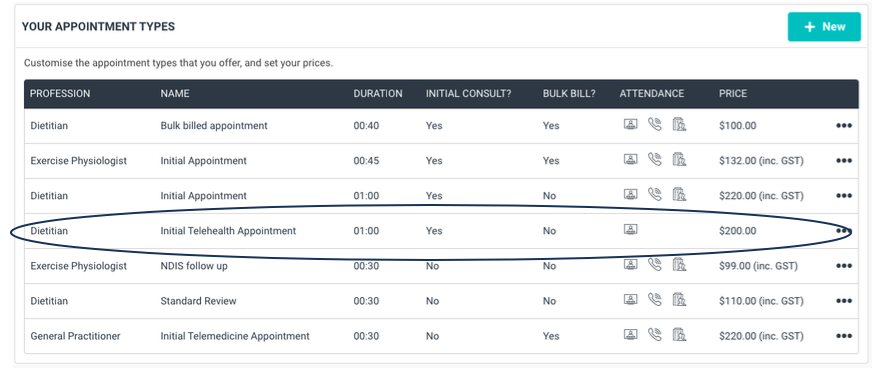
If you need to edit this appointment at any time, click any where on the appointment or on the three blue dots.