---
title: How do I book an appointment?
description: How do I book an appointment?
---
[Skip to content](https://help.healthbank.io/how-do-i-book-an-appointment#main-content)
Open main navigation
Close main navigation
Advice and answers from the HealthBank Team
- There are no suggestions because the search field is empty.
1. [Articles](https://help.healthbank.io/?hsLang=en)
2. [Appointments & calendar](https://help.healthbank.io/appointments-calendar?hsLang=en)
October 13, 2026
# How do I book an appointment?
## Booking an appointment with your preferred practitioner.
There are two ways to book, depending on whether you already see a practitioner on HealthBank.
## If you already have a practitioner
You can book with anyone in your care team.
1. Log in to HealthBank and go to your **Dashboard**.
2. Under **Appointments**, click **Book an appointment**.
3. Choose your practitioner from **Select from your care team**.
4. Pick the appointment you need and click **Book Now**, then **Continue**. The panel on the right shows the length and price.
5. Choose how you’ll attend: **Online**, **Phone** or **In Person** (only the options your practitioner offers are available). Click **Continue**.
6. Pick a date and a time. The **Next available** time is shown at the top. Click **Continue**.
7. Check the details and confirm your booking. You’ll get a confirmation email.
## If you’re new to HealthBank
Go to [www.healthbank.io](http://www.healthbank.io) and scroll down to the section that says "Our Practitioners".
Click on the **Browse all practitioners** button. This allows you to view all the practitioners currently on HealthBank.
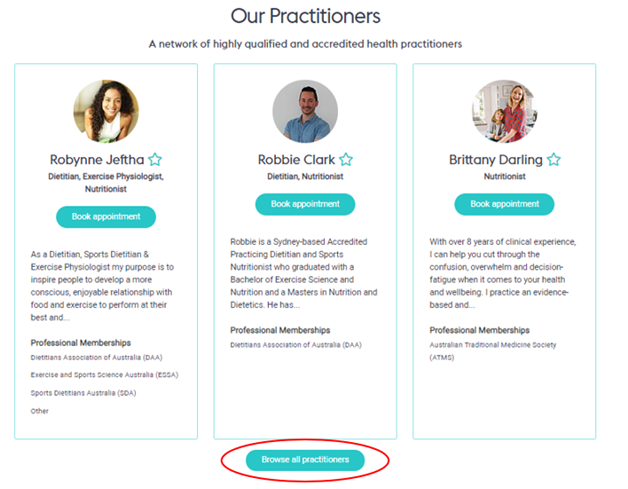
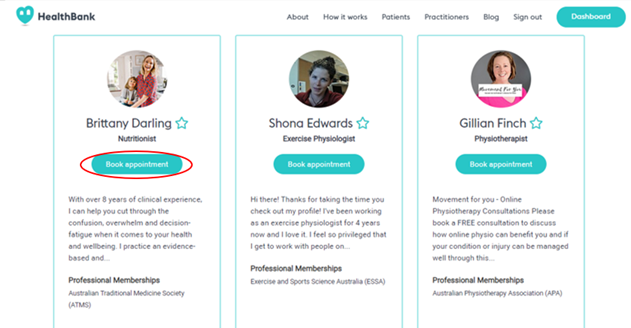
You can view a practitioner bio by clicking on their picture or name. To book an appointment with a particular practitioner, click on the **Book appointment** button.
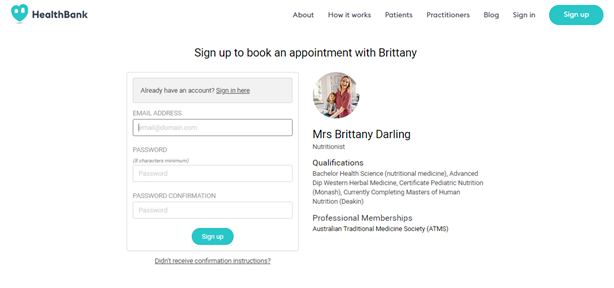
You will then be asked to sign up as a patient to book your appointment.
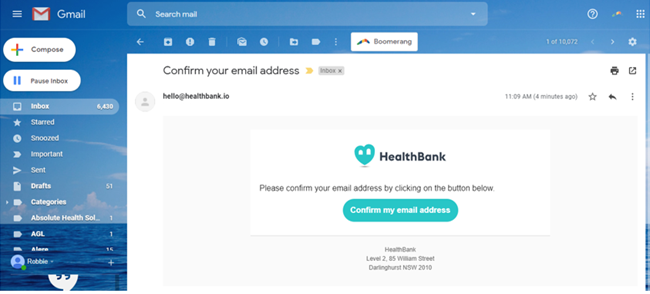
You will then be sent a confirmation email to finish setting up your account.
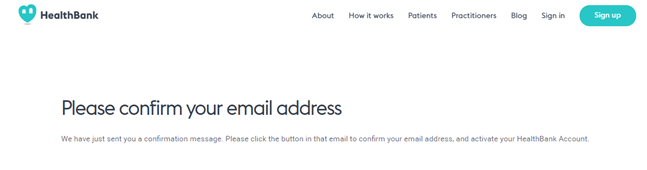
Click on the **Confirm my email address** button in the email.
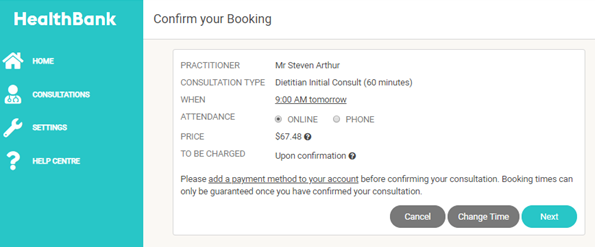
You will then be redirected to HealthBank to confirm your appointment. Click on the **Next** button to add a payment method.
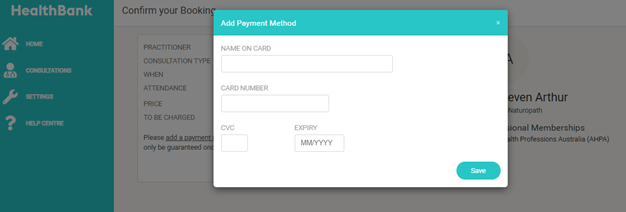
Add a credit card details to pay for the appointment. This information will be securely and privately stored in your profile so you will not have to enter this data again for future bookings unless your card expires or doesn't have enough funds. Once you have saved your payment method, Click the **Save** button
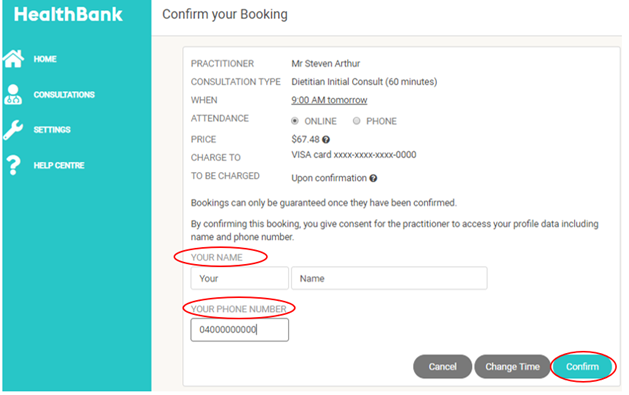
Finally, confirm your appointment information by adding your name and contact number and click the **Confirm** button.
## If something goes wrong
- **I can’t see my practitioner in my care team:** ask your practitioner to send you an invite, or book through their profile as a new client (above).
- **There are no times available:** try another date, or contact your practitioner directly.
- **My card was declined:** see [How do I add, edit or remove my credit card details?](https://help.healthbank.io/how-do-i-add-my-credit-card-details-for-payment?hsLang=en)
Still stuck? [Chat with us](https://help.healthbank.io/how-do-i-book-an-appointment#chat). If you can’t log in, email [support@healthbank.io](mailto:support@healthbank.io).
[](https://www.dashboard.healthbank.io)
HealthBank
85 William Street,
Sydney
[mailto:help@healthbank.io](mailto:help@healthbank.io)
Copyright © 2026, HealthBank Technologie Pty Ltd