---
title: How do I add client treatment notes?
description: How do I add patient treatment notes?
---
[Skip to content](https://help.healthbank.io/how-do-i-add-patient-treatment-notes#main-content)
Open main navigation
Close main navigation
Advice and answers from the HealthBank Team
- There are no suggestions because the search field is empty.
1. [Articles](https://help.healthbank.io/?hsLang=en)
2. [Clients & health records](https://help.healthbank.io/clients-health-records?hsLang=en)
July 23, 2026
# How do I add client treatment notes?
## Adding patient medical/treatment notes
You can write and save client treatment notes anytime by accessing the **NOTES** section on the client's profile.
You can do this by the follow steps:
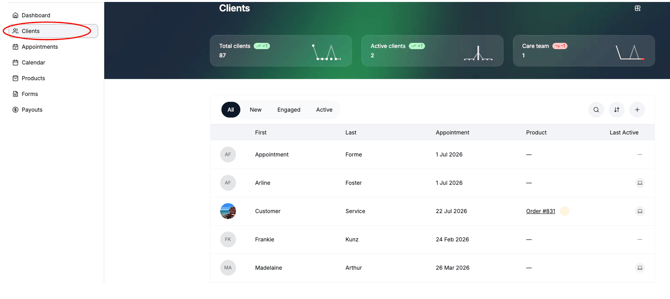
1. Navigate to the client profile - you can search for your clients through the **CLIENTS** tab in you menu bar
2. Click the client you wish to write a note for.
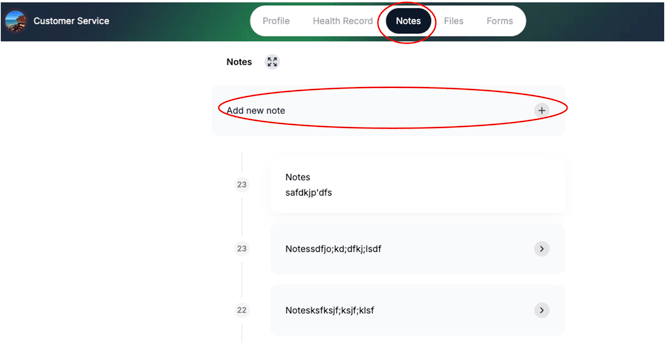
3. On the client profile, click **NOTES**
4. Click **ADD NEW NOTE
**
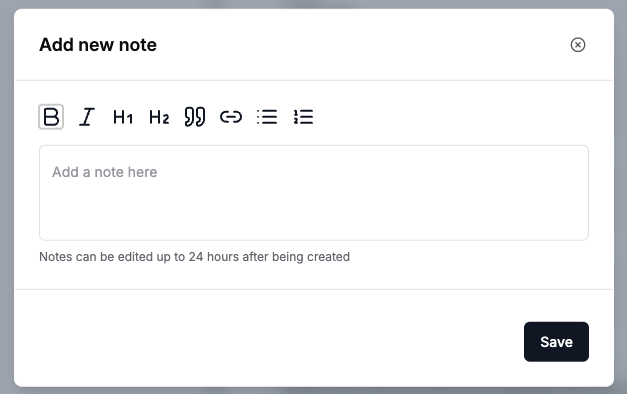
5. Write your notes and then click **SAVE**
[](https://www.dashboard.healthbank.io)
HealthBank
85 William Street,
Sydney
[mailto:help@healthbank.io](mailto:help@healthbank.io)
Copyright © 2026, HealthBank Technologie Pty Ltd